
Security Briefing NS25.1:
ZERO TRUST
Cybercrime has surged to unprecedented levels worldwide and shows no signs of slowing down. Organisations must adopt innovative strategies and best practices to combat these threats. Zero Trust Policy introduces the new standard for maintaining Business Print Management Security.
Today’s distributed workforce requires access to IT infrastructure at any time, from any location. A growing number of digital transformation initiatives are making business data more readily accessible. Numerous IoT devices are now integrated with critical business systems, forming the backbone of modern organisations. These trends are placing security professionals under increasing pressure to support the modern workplace while minimising the organisation’s security attack surface.
Zero Trust has become a powerful approach for ensuring secure access to authorised users and devices while enhancing the overall security posture of organisations. At Xerox, comprehensive security is a core focus, and we provide our clients with products and services that support Zero Trust initiatives. Principles such as “never trust, always verify,” least privilege access, proactive threat detection and remediation, encryption, and security certifications are not new. However, when integrated into a unified security strategy, they form essential components of an effective Zero Trust security programme.
What is Zero Trust?
Zero Trust is a security model designed to address the evolving threats of today’s digital landscape. Unlike traditional approaches that assume trust for users and devices within the network, Zero Trust operates on the principle of “never trust, always verify.” Every user, device, and application must be authenticated, authorised, and continuously validated before being granted access to resources, regardless of location.
Key principles of Zero Trust include least privilege access, where users and systems are granted only the permissions needed to perform their tasks, and continuous monitoring to identify and mitigate threats in real time. Security measures such as multifactor authentication, micro-segmentation, encryption, and proactive threat detection form the backbone of a robust Zero Trust strategy.
This approach is vital in a world of remote work, cloud services, and IoT, which create complex and dynamic environments. By eliminating implicit trust, organisations can reduce their attack surface, enhance compliance, and strengthen overall security, while ensuring seamless access for authorised users.
For further insights into Zero Trust and its implementation, explore resources such as NCSC’s Zero Trust Architecture guidance and Gartner’s Zero Trust Model overview.
How will it benefit your business?
A Zero Trust policy can significantly enhance a business’s security, efficiency, and compliance in today’s complex digital landscape.
Here’s how:
Zero Trust Provides Enhanced Security
- Eliminates Implicit Trust: Zero Trust ensures that every user, device, and application is continuously authenticated and authorised, reducing the risk of insider threats and unauthorised access.
- Minimises the Attack Surface: By enforcing least privilege access and micro-segmentation, sensitive resources are shielded from unnecessary exposure.
- Real-Time Threat Detection: Continuous monitoring and analytics enable businesses to detect and respond to threats proactively.
Improved Regulatory Compliance
- Meets Regulatory Requirements: Adopting a Zero Trust model aligns with data protection regulations like GDPR, ISO 27001, and UK-specific standards, ensuring businesses maintain compliance.
- Auditable Security Posture: The model’s continuous monitoring and logging features simplify compliance audits and reporting.
Policy Implementation Supports Digital Transformation
- Enables Secure Remote Work: Zero Trust secures access for distributed workforces, facilitating remote and hybrid work models.
- Protects Cloud and IoT Environments: It ensures safe operation in complex ecosystems involving cloud services and IoT devices.
Substantive Operational Benefits
- Streamlines Access Management: Automated policy enforcement reduces administrative overhead while maintaining strict security.
- Builds Customer Trust: Demonstrating a commitment to robust security enhances your organisation’s reputation and client confidence.
By adopting Zero Trust, businesses can protect their assets, adapt to modern threats, and create a resilient foundation for growth.
Implementing Zero Trust
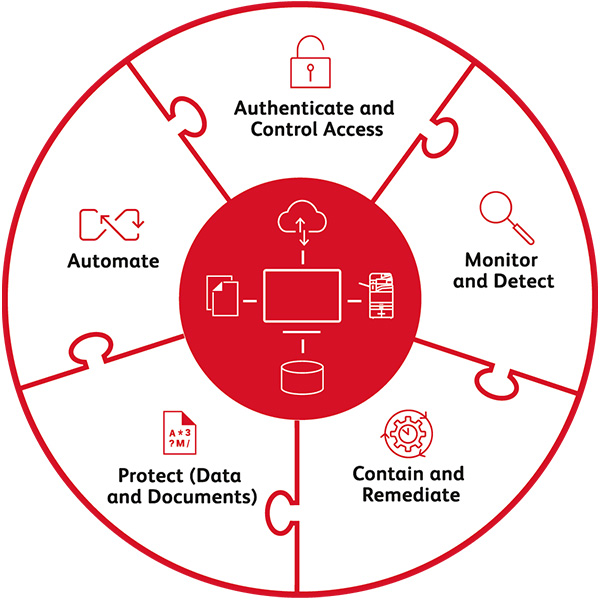
We support your Zero Trust initiatives with the following best practices and recommendations
🔐 AUTHENTICATE AND CONTROL ACCESS
Adopt a “no implicit trust” policy by verifying all user access.
Xerox® Printers are factory-shipped with secure, unique Admin account passwords. Role-Based Access Controls can be implemented using local usernames, PIN codes, card-based authentication, or CAC/PIV secure authentication. Least privilege access and continuous revalidation are supported through inactivity timers and automatic logouts. Multifactor authentication is enabled via Cloud Identity Providers (IdPs) such as Ping Identity, Okta, Microsoft Azure Identity Services, and Xerox® Workplace Cloud or Xerox® Workplace Suite solutions.
Xerox® Workplace Cloud Print Management Solution and Xerox® Workplace Suite Print Management Solution enhance Xerox® Printer capabilities across device fleets, ensuring a consistent approach. These solutions uphold a “never trust” security posture, requiring users to unlock printers with cards, badges, mobile devices, or PIN codes before accessing services.
Xerox® Managed Print Services enforces mandatory authentication for every new user or system connection, defines role-based user access, and manages passwords using NIST 800-171R2-compliant methods. Additionally, CA/Certificate Management ensures authorised printers communicate securely across the network.
🔎 MONITOR & DETECT
Continuously monitor and detect potential security threats to maintain robust protection.
Xerox® Printers feature digitally signed and encrypted firmware, with verification to safeguard against attempts to tamper with system software. Trellix Whitelisting/Allow Listing provides real-time malware monitoring, rejecting malicious activity and notifying users. Trusted Boot ensures the integrity of the system start-up process.
Syslog/Audit log data generation integrates with SIEM tools, including LogRhythm, Splunk, and Trellix Security Manager, offering valuable insights to detect and address security threats. Cisco Identity Services Engine (ISE) helps prevent unauthorised printers from accessing your network. Additionally, Xerox® Workplace Cloud and Xerox® Workplace Suite integrate seamlessly with ID management systems, preventing synchronisation issues between access controls and ID providers. At the device level, tools like reCAPTCHA block brute-force entry attempts.
Xerox® Managed Print Services enable customer-defined security monitoring schedules. Fleet-wide device management is facilitated through the Xerox® Printer Security Audit Service, allowing remote configuration of print and security policies. The service also provides an interactive dashboard for real-time reporting and data insights. Security patches and firmware updates are applied according to the customer’s security policy.
💠 CONTAIN & REMEDIATE
In the event of a potential compromise, promptly contain the threat and take swift action to eliminate it.
At Xerox, we have developed our printers with a security-first approach to prevent threats from infiltrating them. Multiple layers of security features further contain potential breaches. For instance, the Configuration Watchdog feature enables system administrators to implement up to 75 security settings and automatically remediate (reset) them if unauthorised changes occur.
At the fleet level, Xerox® Printer Security Audit Services ensure policy compliance and proactively remediate any devices that fall out of compliance. We regularly review configuration policies to keep them aligned with the latest security requirements, provide expert advice, and offer ongoing security recommendations to support our clients.
📑 PROTECT (DATA & DOCUMENTS)
Employ data encryption techniques and advanced software solutions to safeguard documents and data from both intentional and accidental exposure.
Xerox® printers’ storage drives are secured with 256-bit encryption, and any stored data no longer required can be erased using data clearing and sanitisation algorithms approved by the National Institute of Standards and Technology (NIST) and the U.S. Department of Defense.
Print output is protected through PIN or card release systems, while scan data is safeguarded using digitally signed, encrypted, and password-protected file formats. Our printers also allow you to lock down ‘to/cc/bcc’ email fields, limiting scan destinations to specified domains, such as internal ones. With the Imaging Security feature, Xerox® AltaLink® Printers use infrared (IR) technology to mark and detect sensitive documents, preventing unauthorised duplication and generating alerts and audit logs for any attempts.
Unused network services can be disabled to minimise the network’s attack surface, while IP filtering restricts access to approved clients for scanning, printing, and device management. Secure protocols, including IPsec, HTTPS, LDAPS, and SFTP, protect data in transit, and FIPS mode ensures only the most secure protocols interact with the device.
The Xerox® Workplace Cloud solution encrypts content both in transit and at rest. Clients can encrypt cloud-stored content with their own encryption keys, maintaining control over data visibility while enjoying the benefits of cloud-based print management. The Content Security feature in Xerox® Workplace Cloud and Workplace Suite solutions identifies predefined sensitive content and generates alerts and reports based on its usage.
Xerox® Printer Security Audit Services verify that data and document protection features are active across the fleet, address policy violations, and provide compliance reports.
💠 CONTAIN & REMEDIATE
In the event of a potential compromise, promptly contain the threat and take swift action to eliminate it.
Simplify security policies for optimal results. Automation enhances efficiency, enabling security teams to focus on critical priorities. The Fleet Orchestrator feature in Xerox® Printers automates device configuration and applies firmware updates across a printer network, ensuring compliance while easing the workload for IT staff.
Through integration with Cisco ISE and Trellix (formally known as McAfee) ePolicy Orchestrator, printers can be automatically quarantined upon detecting a threat. This safeguards the printer, the network, and other endpoints from potential harm.
Xerox® Printer Security Audit Services utilise a centralised policy management system and device grouping to simplify fleet management with minimal effort. Compliance enforcement and validation processes are fully automated, reducing manual intervention. Intuitive dashboards display fleet, policy, and device compliance information in a clear, graphical format, providing actionable insights at a glance
Summary
A successful security program depends on a simple and enforceable security policy, backed by product features and services that ensure compliance.
Zero Trust is quickly becoming the standard security model of choice for Business Print Management Security policy.
By implementing the Xerox security recommendations outlined in this brief, businesses can safely provide authorised user access, limit exposure in case of data breaches, and automate responses to potential security threats.
Like to know more about how Xerox can help your business?
Contact our team now or call 01865 598 777